Video to GIF conversion in your browser
Choose a browser-supported video up to 10 MB and 10 seconds. The source is decoded locally, so converting a video to a GIF does not require uploading the original clip to our server.
Turn a video into a shareable loop. Pick the best seconds, add your punchline and download a GIF without a watermark.
Choose a file or drag it onto this canvas.
Browser-supported video · Up to 10 MB / 10 secBUILT AROUND ONE JOB
Everything on this page supports the same focused workflow: open your source, make the edit you need, preview it and export a GIF. Your source is processed locally in your browser.
Choose a browser-supported video up to 10 MB and 10 seconds. The source is decoded locally, so converting a video to a GIF does not require uploading the original clip to our server.
Set start and end times beneath the canvas to isolate your favorite moment. The preview and exported GIF use the same range, so you can check how the ending returns to the beginning.
Write top, bottom or additional text, change its size and drag it into place. White letters with a dark outline help the joke remain visible over a changing video background.
Attach a caption to a person in the clip, review the tracking and correct its offset. This is useful when a fixed caption would drift away from the person delivering the reaction.
Free standard export is up to 360px and 2 MB, with no watermark or account. HD export is up to 720px and costs one credit after sign-in; neither GIF contains the video's audio.
The editor checks file size, duration and browser playback before conversion. If a clip cannot open, trim it on your device and use a video format your browser supports.
THREE STEPS. ONE GREAT RESULT.
Choose a browser-supported video up to 10 MB and 10 seconds. Set the start and end times beneath the preview to keep just the moment you want. The preview loops your selected range and the export uses the same selection.
Type a top or bottom caption and use the controls to change its size and position. The canvas previews the video and text together. Drag a caption on the preview or adjust its position sliders until the text stays readable.
Standard export is free, up to 360 pixels on the longest side and compressed to at most 2 MB. HD export is up to 720 pixels and costs one credit. GIFs do not contain the original audio.
FROM SOURCE TO SHARE
Real source media, real MemeLoop exports. Compare the before and after, then open an example to make it your own.
MADE WITH MEMELOOP
Turn a short pet video into a silent reaction GIF. Compare the three-second MP4 with the actual loop exported by MemeLoop.
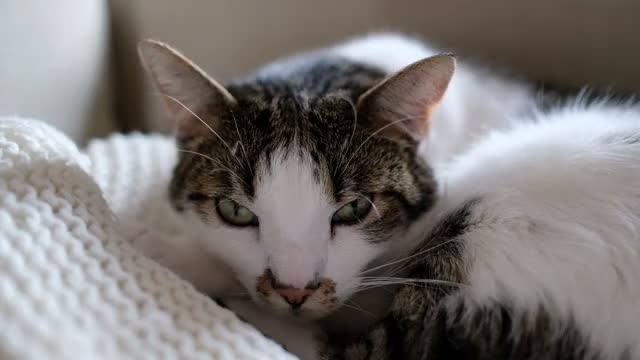
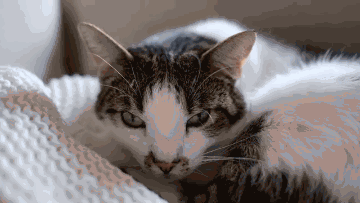
Media by Francesco Ungaro on Pexels · Pexels License.
A three-second excerpt, resized to 640 × 360. The uncaptioned GIF was exported with MemeLoop’s video to GIF tool.
SCENARIOS & SOLUTIONS
For a source within 10 seconds, set start and end times below the canvas. If your original is longer than 10 seconds, shorten it on your device before opening it here.
Check that the file is no larger than 10 MB and no longer than 10 seconds. Browser playback support also matters, so try a compatible video format if decoding fails.
Shorten the caption, drag it to a calmer area and adjust its size. The white text and dark outline help, but a less busy position usually makes the biggest difference.
Free standard export targets 2 MB or less and may reduce dimensions or frame rate. Start with a short, visually simple clip; HD prioritizes a larger image and is not the small-file option.
GOOD TO KNOW
Yes. Set the start and end times beneath the preview. Only that range is included in your exported GIF. Source videos must still be no longer than 10 seconds.
No. The GIF format used here does not include audio.
Check the 10 MB and 10 second limits and try a format your browser can play.
No. Standard exports are free and have no watermark.
GIF creation runs in your browser; the source video is not uploaded for conversion.
Processed on your device. Free standard export. No watermark.